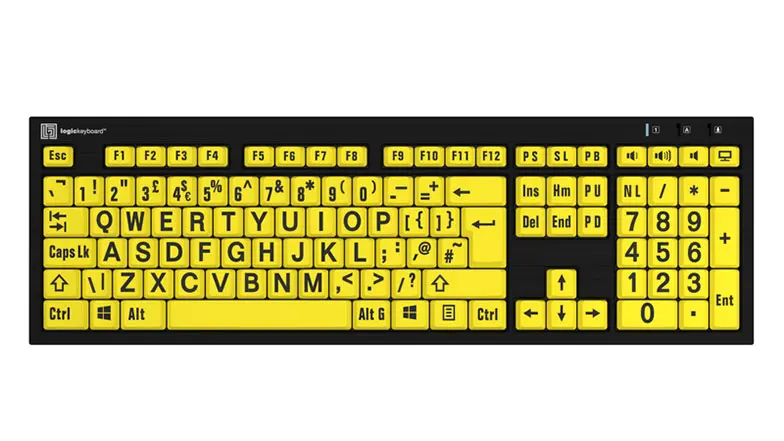
Best large print keyboards
How we chose the best large print keyboards
As large print keyboards have been designed for a range of users, there are a few factors to consider before making a purchase.
We’ve taken into account letter size, ergonomics, colour contrasts, installation, spill protection and compatibility to compile some of the best large print keyboards to choose from.
This keyboard features white text on black keys and is wired for easy set up. While it may be a great option for some, the AbleNet large print keyboard is only compatible with Windows 8 so if you’re working on a computer with a different operating system, you may want to choose another keyboard from this list. If compatibility is not an issue, this large print keyboard boasts that it was built to withstand million keystrokes and resist spills. This keyboard is available to purchase for around £59.
Tailored to desktop users, this full-size large print keyboard retails for around £85. It offers a detachable LED down-light for increased visibility and plenty of high-contrast colour combinations. You can choose from: white letters on black keys, black letters on white keys, yellow letters on black keys, and black letters on yellow keys.
The letter size on this keyboard is over four times bigger than you would see on a traditional PC keyboard. It’s compatible with Windows XP, Vista and 7-10, and can be simply plugged into your computer with a USB cable.
The ZoomText Keyboard has 18 useful shortcut keys to make the most of ZoomText screen magnification software, allowing you to start the program, change magnification levels, launch the AppReader and DocReader and more. You can also reassign these keys to different commands that better suit you.
Available for around £140, it can be purchased in two colour schemes – choose between 36-point text black lettering on yellow keys, or white lettering on black keys. This connects to your computer with a USB connection and is compatible with PCs running Windows 2000 or later, and ZoomText Magnifier, Magnifier/Reader or Fusion v9.03 and above.
Built for desktop and laptop computers, this large print keyboard provides easy access to Dolphin’s SuperNova assistive technology range including magnification, screen reading, braille support and more. Its 18 additional ‘quick buttons’ link users up with the handy SuperNova functions. With these specially designed keys you can start SuperNova, increase and decrease screen magnification, open the control panel, toggle speech on and off, adjust the speed of speech, change screen settings to high colour contrast, and access an array of online services.
This keyboard has high contrast colouring with large white lettering on black keys and is compatible with computers running Windows Vista, XP Home, XP Pro, 7 or 8. It can be connected via a USB cable. To be compatible with Dolphin SuperNova, your PC must be running v13.50 or later. It can be purchased for around £59.
Another great option at around £59, the Ezsee Low Vision Keyboard again features black text on yellow keys. It will work with Windows 98, 2000, XP, Vista, 7 and ME. It’s a wired keyboard so all you need to do to set up is plug it into your device using the USB port.
The HDE large print keyboard’s lettering is the largest size possible on keys as compared to a typical keyboard. It has high contrast black lettering on yellow keys and is designed to withstand small spills offering peace of mind – just air dry it completely before you next use it.
You don’t need any extra software to set this one up so all you have to do is plug it in and start working. It works with Windows and Apple computers, compatible with Windows 98, 2000, XP, Vista, 7, 8 and 10, and Mac OSX and macOS. It is available for around £57.
Specifically designed for Mac users, the Tech Silver large print keyboard features a raised bar to support angled typing potentially to reduce or to avoid wrist strain. It also includes an adjustable lamp that may increase visibility of the keys which come in three colours – choose from black text on white keys, white text on black keys, and black text on yellow keys.
It includes all the keyboard shortcuts Mac users will be familiar with and works with devices running Mac OS X v 10 and later. Simply plug it in via the USB port and get started. You can buy this keyboard for around £39.95.
This large print keyboard was created in collaboration with the RNIB so you can trust it’s been designed with accessibility and ease of use in mind.
Available to purchase from around £40, it comes with a detachable padded wrist rest to ensure comfort when typing for long periods of time and can cope with minor spillages.
The keys - choose from black lettering on white keys or black lettering on yellow keys – have been printed using a specially designed UV print so that they won’t fade in sunlight.
It couldn’t be more simple to set up, requiring only a USB connection so you can just plug in and get started, and is compatible with Windows, Macs and Linux computers.